1 Gang Smart Switch: The Best Single-Gang Smart Switches for UK Homes in 2026
A single-gang smart switch gives you app control, schedules and voice commands for one lighting circuit — no hub, no rewiring of the whole house, no new…
1 Gang Smart Switch: The Best Single-Gang Smart Switches for UK Homes in 2026
A single-gang smart switch gives you app control, schedules and voice commands for one lighting circuit — no hub, no rewiring of the whole house, no new lighting design. But the UK has a quirk that decides most purchases before brand or budget ever come into it: whether there is a neutral wire available at the switch box. Buy a with-neutral model for a loop-in ceiling-rose circuit and it simply will not power up. Buy a no-neutral model for a load that is too small and it will flicker, glow faintly when “off”, or refuse to boot.
This guide compares the 1 gang smart switches worth considering in the UK in 2026, using manufacturer specification sheets, UK smart home community consensus and owner reviews. It is desk research, not hands-on testing, and every hard figure below is attributed to the manufacturer or publication it comes from.
Quick picks
| Best for | Product | Typical price |
|---|---|---|
| Best overall — works with or without a neutral | WiFi Smart Home One Gang Pure Glass WiFi Smart Switch | around £35–£45 |
| Best no-neutral retrofit | MOES BHT-005-GCLW, or the Yagusmart 1-gang no-neutral | Varies by SKU and seller — confirm current pricing |
| Best budget with-neutral | SONOFF M5-1C | around £15–£20 (Amazon UK) |
| Best Zigbee / Matter route | Aqara Smart Wall Switch H1 (WS-SC7 or WS-SC7-N) | Varies by SKU, and by whether you need an Aqara hub |
What “1 gang” actually means
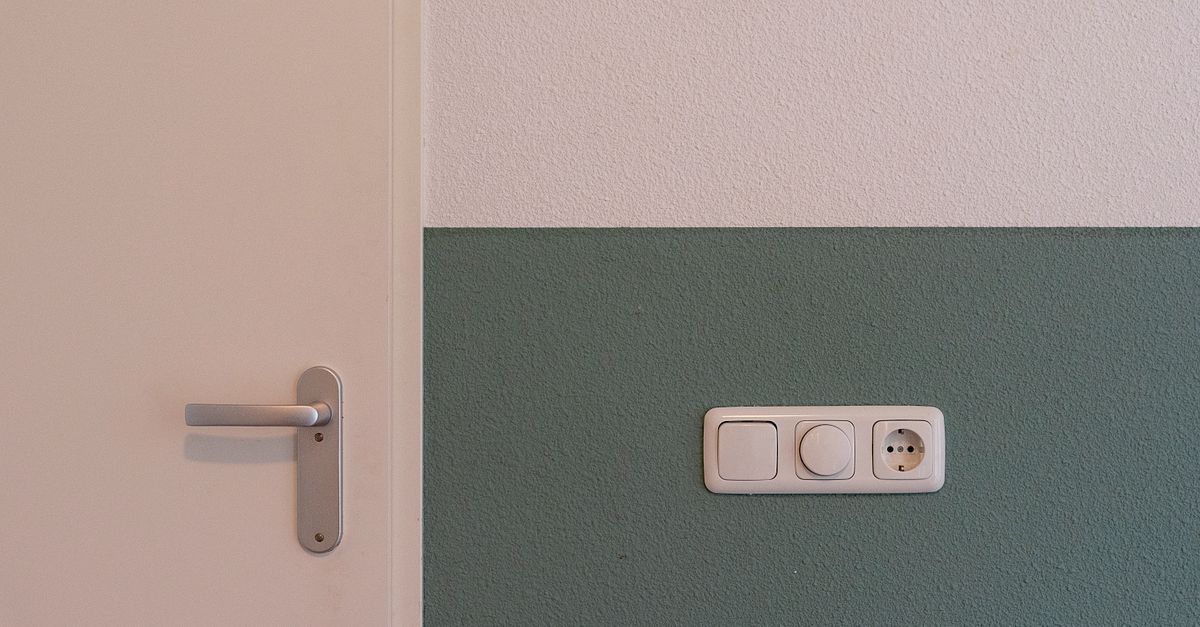
A “gang” is the number of switchable circuits on a single faceplate. A 1 gang smart switch controls one lighting circuit: one ceiling light, one run of downlights, one outdoor light. A 2 gang version puts two rockers on the same 86mm plate. If you have one light and one switch, a 1 gang unit is what you need — and buying a 2 gang by mistake leaves one rocker permanently redundant on the wall.
Smart versions replace the mechanical rocker with a touch panel or push-button and add functionality the mechanical switch cannot offer:
- App control over Wi-Fi, Zigbee or Matter, so the light can be switched from a phone anywhere in the house or remotely.
- Schedules and timers, which matter most for hallways and security lighting, where the point is the house looking occupied while you are out.
- Voice control through Amazon Alexa, Google Home or Apple Home, depending on which ecosystem the model supports.
- Scenes and routines, letting one tap or one voice command set several lights at once.
- Multi-way programming, which lets two or three smart switches control the same light without a physical traveller wire between them.
The deciding question: is there a neutral at the switch box?
This is the axis that separates a working install from a dead switch, and it has nothing to do with brand or price.
Traditional UK lighting circuits are frequently wired loop-in at the ceiling rose. The permanent live and the switched live both arrive in the ceiling, and only two wires plus earth drop down to the switch. The neutral stays up in the ceiling. Older and cheaper smart switches assume a neutral is present at the switch box, which is why so many early adopters found their new purchase dead on arrival.
There are three ways around it:
- Buy a no-neutral smart switch. These pass a tiny trickle current through the lamp to power their radio. The WiFi Smart Home glass unit below is rated for both wiring arrangements, which is unusual and is a large part of its appeal.
- Run a neutral to the switch. Feasible if you are already chasing walls or have conduit, but this is a job for a qualified electrician.
- Use a bypass capacitor where the manufacturer supplies one — more common with dimmer modules — to stop LED lamps glowing faintly when the switch is off.
Manufacturer specs are the only reliable source here. Product listings, including Amazon UK ones, frequently conflate with-neutral and no-neutral SKUs under a single listing, so check the exact model code before you order — the Aqara H1 below is a good example, since its two SKUs differ by a single suffix.
Minimum load: the number-one real-world failure mode
A no-neutral switch powers itself by bleeding a small current through the lamp even when the light is “off”. If the lamp draws less than the switch needs, that current is enough to make LEDs glow faintly, or the switch never boots properly at all.
The floors are published, and they differ:
- MOES publishes a 3W minimum for its BHT-005-GCLW, specified for resistive loads.
- Yagusmart states a 5W minimum on its 1-gang no-neutral unit.
Below those thresholds you get flicker, a dim glow or a failure to start. Reddit’s r/homeautomation and r/smarthome communities report exactly this pattern repeatedly with no-neutral units running low-wattage LED bulbs — it is the single most common complaint about the category, and it is a wiring-and-load problem rather than a fault.
If you are buying a no-neutral switch, add up the wattage of every lamp on that circuit before ordering, and treat the minimum as a floor with some headroom rather than a target.
Back box depth: the hidden retrofit cost
Every smart switch on this list is deeper than the mechanical switch it replaces. Standard UK surface boxes are 16mm or 25mm, and the manufacturer requirements here are all comfortably beyond that:
- MOES BHT-005-GCLW and the Yagusmart no-neutral unit: at least 35mm, per their install guides.
- SONOFF M5-1C: at least 32mm, per SONOFF’s specification.
- Aqara H1: at least 33mm, per Aqara’s install guide.
In practice, most UK retrofit jobs need a new back box. That is a modest part — typically around £3–£8 per box — but the electrician’s labour to fit it is extra, and Amazon UK reviews for Tuya-class glass switches consistently flag back box depth as an unexpected retrofit cost. If you were budgeting for a switch only, budget for a box as well.
Protocols: Wi-Fi, Zigbee and Matter — and the 2.4GHz trap
Wi-Fi switches need no hub, which is why they dominate the budget end. The trade-off is cloud dependency: MOES and Yagusmart units run on the Tuya platform, and there is no local control without Home Assistant or a Tuya Local integration. If the cloud service or your broadband drops, app control goes with it. Wi-Fi units in this class are also typically 2.4GHz only — the MOES and Yagusmart datasheets are explicit about it — which means they cannot see 5GHz SSIDs. That is a very common setup failure: the phone is on the 5GHz band, the switch never appears in the pairing list, and the buyer concludes the unit is faulty.
Zigbee switches pair to a hub, and once set up they run automations locally. The Aqara H1 is locally controlled through its hub with no cloud dependency for automations, as documented in Aqara’s developer documentation — a meaningful difference if you care about your lights working during an internet outage.
Matter arrives at the H1 only through an Aqara hub M2 or M3 acting as a Matter bridge. The switch itself is Zigbee only; native Matter requires the hub. That distinction catches people out when they read “Matter support” on a listing and expect it out of the box.
2-way and multi-way circuits
Most no-neutral Wi-Fi units do not support converted 2-way wiring — the arrangement where a circuit has been rewired so two switches control the same light. Check the manufacturer’s wiring diagram before ordering if you have a two-switch circuit anywhere, because the app-based multi-way programming described above is not the same thing as supporting your existing physical traveller wiring.
UK wiring rules, markings and earthing
Three practical points govern a UK install:
- Part P. Replacing a switch like-for-like is notifiable under Part P only if it is in a bathroom or kitchen zone. A living room or hallway replacement is DIY-permissible, though a competent person is recommended — this is set out in the Building Regulations Part P guidance on GOV.UK.
- Markings. All units sold in the UK must carry UKCA or CE marking, so check the product listing for a declaration of conformity. A seller who cannot supply one is a seller to walk away from.
- Standards and earthing. BS 7671 (18th Edition, Amendment 2) governs the wiring itself, and no-neutral installs using trickle current must not exceed leakage thresholds — the IET’s Wiring Matters guidance is the reference point. Metal faceplates, and any faceplate with conductive parts, require the faceplate itself to be earthed, per the manufacturer’s install guide.
The best 1 gang smart switches in 2026
WiFi Smart Home One Gang Pure Glass WiFi Smart Switch — best overall
Best for: anyone who does not yet know whether they have a neutral at the switch, and wants a single purchase that works either way.
What it is: a glass-faceplate single-gang Wi-Fi switch rated for both with-neutral and no-neutral wiring — an unusual claim in this category, where most listings force you to know your wiring before you can even choose a model. It needs no hub, so there is no second purchase and no second app to configure, and it presents as a clean glass panel rather than a plastic rocker. Typical pricing is around £35–£45.
Standout strength: the dual-rating removes the single biggest cause of a failed UK install. You can order before your electrician has confirmed the wiring, which is not true of anything else here.
Honest caveat: it is a Tuya-class Wi-Fi device, so the cloud-dependency and 2.4GHz-only cautions covered above apply. It also needs the same deep back box as everything else on this list, and Amazon UK reviews for this class of glass switch repeatedly flag that as an unbudgeted extra.
Where to buy: typically sold through online marketplaces; confirm the exact model code, the neutral rating and current pricing before ordering.
Verdict: the safest single purchase if your wiring status is unknown — pay the premium and skip the guesswork.
MOES BHT-005-GCLW / Yagusmart 1-gang no-neutral — best no-neutral retrofit
Best for: confirmed loop-in circuits with no neutral at the switch box, where you do not want to run new cable.
Key specs: MOES publishes a 3W minimum load for the BHT-005-GCLW, specified for resistive loads. The Yagusmart equivalent states a 5W minimum. Both require a back box of at least 35mm depth. Both are rated at 1000W, but that is a resistive-load figure only — for LED loads the practical derate is typically around 200W, and the manufacturer does not publish an LED derate figure on the datasheet, which is precisely why the minimum-load floor matters more than the headline wattage. Both are 2.4GHz Wi-Fi only. Both run on the Tuya platform and are cloud-dependent, with no local control without Home Assistant or Tuya Local.
Standout strength: these are the genuine no-neutral options — they power themselves from the trickle current through the lamp, so no new cable and no ceiling access.
Honest caveat: that same trickle current is the failure mode. Below 3W (MOES) or 5W (Yagusmart) you get a faint glow when the switch is off or a switch that will not boot, and Reddit’s r/homeautomation and r/smarthome communities report this with low-wattage LEDs as a routine occurrence. These units also do not support converted 2-way wiring.
Where to buy: sold direct from the manufacturer and through online marketplaces; check the model code against the MOES or Yagusmart spec page, since those pages are the source for the load figures above.
Verdict: the correct choice when there is no neutral and no appetite for new cable — provided your lamp load comfortably clears the floor.
SONOFF M5-1C — best budget with-neutral
Best for: newer builds and any property where a neutral is confirmed at the switch box, on the tightest budget.
Key specs: the M5-1C requires a neutral at the switch box, confirmed on SONOFF’s own product specification page at itead.cc — and this disqualifies it for most loop-in ceiling-rose wiring, plain and simple. It needs a back box of at least 32mm. It runs on the eWeLink app and is Alexa and Google certified. There is no native HomeKit support — Siri control requires the Shortcuts workaround or a Homebridge bridge. Typical pricing is around £15–£20 at Amazon UK; confirm current pricing before ordering.
Standout strength: it is the cheapest credible route into single-gang smart switching, and owner reviews consistently praise eWeLink’s reliability — a real advantage at this price point.
Honest caveat: the same reviews criticise cloud dependency, and the neutral requirement is absolute. If you have ceiling-rose wiring, no amount of configuration will make this switch work. The absence of native HomeKit is the other thing to weigh if you are an Apple household.
Where to buy: Amazon UK is the mainstream source, with SONOFF’s own store as the reference point for specs.
Verdict: unbeatable value if — and only if — you have a neutral at the switch.
Aqara Smart Wall Switch H1 — best for Zigbee and Matter
Best for: Apple, Alexa and Google households that want local control and are willing to add a hub.
Key specs — and the two SKUs that matter: WS-SC7 is the no-neutral version and WS-SC7-N is the with-neutral version. They are distinct products under one product name, so confirm the suffix on the box. Matter arrives via an Aqara hub M2 or M3 acting as a Matter bridge — the switch itself is Zigbee only, and native Matter requires the hub. Back box requirement is at least 33mm per Aqara’s install guide. Once configured, the switch is locally controlled through the hub, with no cloud dependency for automations, as documented in Aqara’s developer documentation.
Standout strength: local execution. Automations keep running if the internet drops, which is the structural argument for Zigbee over budget Wi-Fi, and the hub doubles as the Matter bridge for anyone standardising on Matter.
Honest caveat: it is not a standalone purchase. Without a hub you get neither Matter nor local execution, and the SKU you need depends entirely on your wiring — order the wrong suffix and you are back to square one.
Where to buy: widely stocked by UK online retailers and sold direct; confirm the SKU (WS-SC7 or WS-SC7-N) and whether you need an M2 or M3 hub.
Verdict: the best-engineered option here, provided you accept that the hub is part of the price of admission.
Other UK-available names to know
Several other single-gang options are widely available in the UK: Tapo S500D, Meross MSS550, Shelly 1, Scolmore Click Smart, Lightwave LP12, Hive Active Light Control and Den Smart Switch. The neutral requirement varies by exact model and SKU rather than by brand — which is exactly the trap described above, where one listing covers several SKUs. Whatever you shortlist from this list, confirm the neutral requirement on that manufacturer’s own specification page before ordering, and check the back box depth at the same time, because none of them will fit a 16mm or 25mm surface box.
FAQ
Do I need an electrician to fit a 1 gang smart switch?
Not always. Replacing a switch like-for-like is notifiable under Part P only when it is in a bathroom or kitchen zone; a living room or hallway replacement is DIY-permissible, though a competent person is recommended. In practice the deciding factor is the back box: if you need a deeper box cut in, that is electrician territory.
How do I know whether I have a neutral at the switch box?
In a loop-in ceiling-rose circuit the neutral stays in the ceiling and only the permanent live, switched live and earth drop to the switch. A qualified electrician can confirm it in minutes. If you buy a no-neutral model like the MOES BHT-005-GCLW or the Aqara WS-SC7 anyway, you are covered either way — but the reverse is not true.
Why does my LED lamp glow faintly when the smart switch is off?
That is the trickle current a no-neutral switch passes through the lamp to keep its radio alive. MOES specifies a 3W minimum load and Yagusmart a 5W minimum; below that the current is enough to light the LED dimly. Where the manufacturer supplies one, a bypass capacitor resolves it.
Will my new switch connect to my Wi-Fi?
Check the band first. Wi-Fi units in this class are typically 2.4GHz only — the MOES and Yagusmart datasheets state it explicitly — and they cannot see 5GHz SSIDs. If your router runs a single combined SSID, or you can split the bands temporarily, pairing usually works.
Can one 1 gang smart switch control more than one light?
Yes, if those lights share a single circuit — a run of downlights on one switch is one gang, not many. Two separately switched circuits need a 2 gang unit, or a second smart switch. Watch the load maths too: the 1000W ratings quoted on no-neutral units are resistive-load figures, with LED loads derating to typically around 200W.
Does the Aqara H1 work with Apple Home without a hub?
No. The H1 is Zigbee only, and Matter — the route into Apple Home, Alexa and Google — comes from an Aqara hub M2 or M3 acting as a Matter bridge. The hub is also what enables the local, cloud-free automations that are the H1’s main advantage.
What should I check about UKCA and CE markings?
All units sold in the UK must carry UKCA or CE marking, and the listing should support that with a declaration of conformity. On an electrical device wired permanently into your lighting circuit, that paperwork is your assurance the product has been tested to the relevant standard — and it matters for insurance purposes if anything goes wrong.
My back box is only 25mm deep — what are my options?
None of the switches in this guide will fit: MOES and Yagusmart need at least 35mm, SONOFF states 32mm and Aqara 33mm. The realistic answer is a new deeper back box, typically around £3–£8 for the box itself plus the electrician’s labour to fit it. Allow for that cost in your budget from the start rather than discovering it on installation day.
The bottom line
The buying decision for a 1 gang smart switch is a wiring question, not a brand question. Confirm whether there is a neutral at the switch box, then check the minimum load if you are going no-neutral, then check the back box depth — in that order. Get those three right and any of the models above will do what you asked of it; get the first one wrong and nothing else on the specification sheet matters.