Best Smart Meter Display UK: IHDs, CADs and Getting the Data Out
The free display from your energy supplier versus a device that actually feeds your smart home — a UK guide to IHDs, CADs and Home Assistant.
Best Smart Meter Display UK: IHDs, CADs and Getting the Data Out
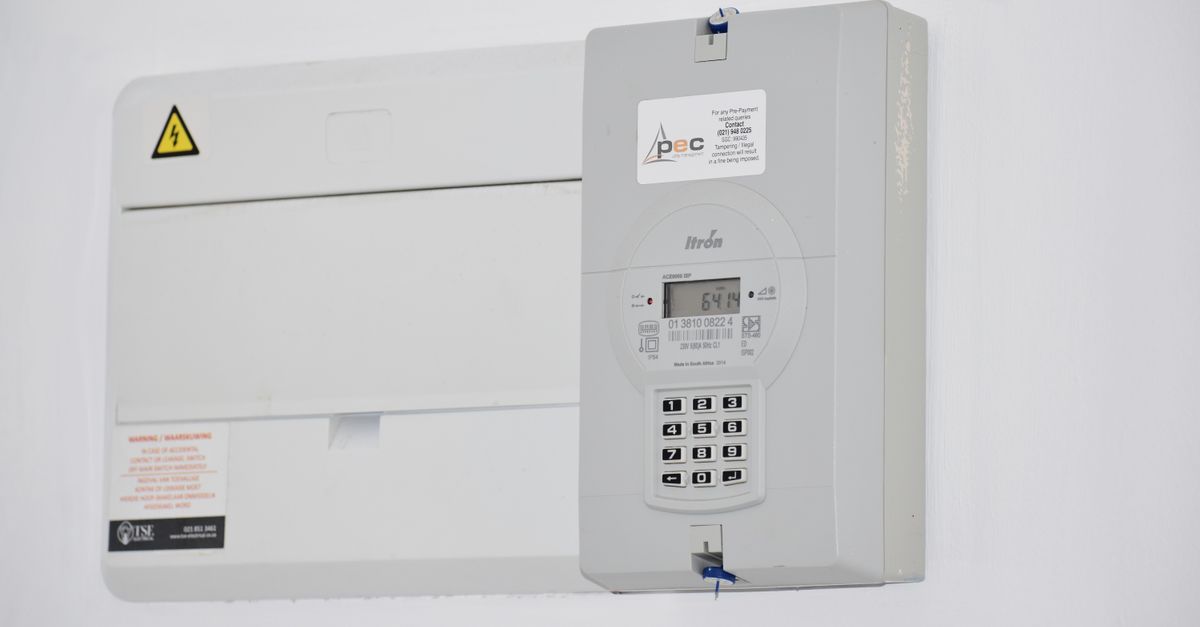
Every smart meter installation comes with a small display, and most of them end up in a drawer within a month. The reason is not that the data is useless — it is that a device showing a number on a kitchen worktop is a poor way to consume it. What has changed is that you can now get the same data into your phone or your home automation system, which is where it becomes genuinely useful. This guide is based on desk research: manufacturer specifications, supplier documentation and UK retailer listings rather than first-hand testing. Below you will find what the terms mean, what your supplier owes you, and how to get the data somewhere useful.
Quick Reference
| Device | What it is | Cost |
|---|---|---|
| IHD (In-Home Display) | The standard screen your supplier provides | Free with installation |
| CAD (Consumer Access Device) | Reads the meter and sends data onward to an app or hub | Varies; some free with a tariff |
| Combined IHD/CAD | A display that also forwards the data | Around £50–£100 |
What Your Supplier Owes You
Under the smart meter rollout, energy suppliers provide an In-Home Display with a smart meter installation, at no cost. It shows near-real-time electricity use, cost, and historical comparisons, and it talks to the meter over the meter’s own wireless network rather than your home wifi.
Two practical points:
If yours is lost or broken, ask. Replacement policies vary by supplier, but it is worth asking rather than buying one.
SMETS1 versus SMETS2 matters. Early SMETS1 meters were tied to the supplier that installed them and often went “dumb” on switching, though a national programme has migrated many of them. SMETS2 meters are interoperable by design and keep working across suppliers. If your display stopped working after a switch, this is usually why.
Why the Free Display Ends Up in a Drawer
It is worth being honest about this rather than recommending a nicer screen.
A worktop display shows you consumption now. That is useful for about a fortnight, while you learn what a kettle costs and discover the immersion heater. After that the number stops teaching you anything, because your consumption is mostly structural — heating, hot water, appliances you cannot change hour to hour.
What remains useful over time is the history and the automation: comparing this month to last, spotting an appliance that has started drawing more than it used to, or actually doing something automatically when the rate is cheap. None of that is served by a screen on a worktop.
Getting the Data Somewhere Useful
This is where a Consumer Access Device comes in. A CAD joins the meter’s network and forwards the readings to an app, a cloud service or your local home automation system.
Supplier-provided options. Some suppliers offer their own device that streams consumption into their app, occasionally free on certain tariffs. If you are on a time-of-use tariff, this is often the easiest route and the one with the best integration into that supplier’s own pricing.
Independent CADs. Devices from the established display manufacturers connect to the meter and expose the data through an app and, importantly, a local or cloud API.
The Home Assistant angle. This is the one that makes the whole exercise worthwhile for anyone already running a smart home. With a CAD feeding Home Assistant you get half-hourly or near-real-time consumption as a sensor, which means:
- Energy dashboards with genuine history rather than a fortnight of curiosity
- Automations that run appliances when the rate is low, if you are on a variable tariff
- Alerts when standing consumption rises, which is how you catch a failing appliance
- Cost tracking per circuit if you combine it with individual smart plugs
That last set is the actual argument for spending money here.
What to Look For
Compatibility with your meter generation. SMETS2 is broadly fine. SMETS1 depends on whether it has been migrated.
Local access, not just cloud. A device that only talks to a manufacturer’s cloud is a device that stops working when that service does. Local API access is worth more than a nicer screen.
Export data if you have solar. Not every device reports export as well as import; if you have panels, check specifically.
Gas as well as electricity. Gas readings update far less frequently than electricity by design — the gas meter is battery-powered and reports periodically. Do not expect live gas data from anything.
Update frequency. Electricity is typically near-real-time for the display and half-hourly for the data feed. Marketing sometimes blurs the two.
Realistic Expectations
A display or CAD does not reduce your bill by itself. What it does is show you where consumption actually is, which occasionally produces a genuine finding — an immersion heater on a timer nobody set, a freezer failing slowly, an electric shower being used more than assumed.
The larger savings usually come from what you do with the information afterwards, and on a time-of-use tariff from shifting load automatically. If you are not on a variable tariff and not running home automation, the free supplier display is very likely all you need.
FAQ
What is the difference between an IHD and a CAD? An In-Home Display is the screen your supplier gives you with a smart meter — it shows consumption and cost, and that is all. A Consumer Access Device reads the same meter data and forwards it onward to an app, a cloud service or a home automation system, which is what you need if you want history, dashboards or automation.
Can I connect a smart meter to Home Assistant? Yes, via a Consumer Access Device that joins the meter’s network and exposes the data locally or through an API. That gives you consumption as a sensor, which enables energy dashboards, cost tracking and automations that shift load to cheaper periods on a variable tariff. Prefer a device with local access over one that only talks to a vendor cloud.
My smart meter display stopped working after switching supplier — why? Almost certainly a first-generation SMETS1 meter, which was tied to the installing supplier and often lost functionality on a switch. A national migration programme has moved many onto the shared network; contact your supplier to check whether yours has been done. SMETS2 meters are interoperable and do not have this problem.
Is it worth buying a better smart meter display? Only if you will use the data. A nicer screen on the worktop stops teaching you anything after a couple of weeks. Spending money makes sense when you want the data in an app or in Home Assistant — for history, for catching an appliance drawing more than it should, or for automating load onto cheap rates.