How to Top Up a Smart Meter: Every Method Explained (Plus Supplier Comparisons for 2026)
How to top up a smart meter in the UK by app, website, PayPoint or text, plus emergency credit rules and SMETS1 vs SMETS2 explained for PAYG customers.
How to Top Up a Smart Meter: Every Method Explained (Plus Supplier Comparisons for 2026)
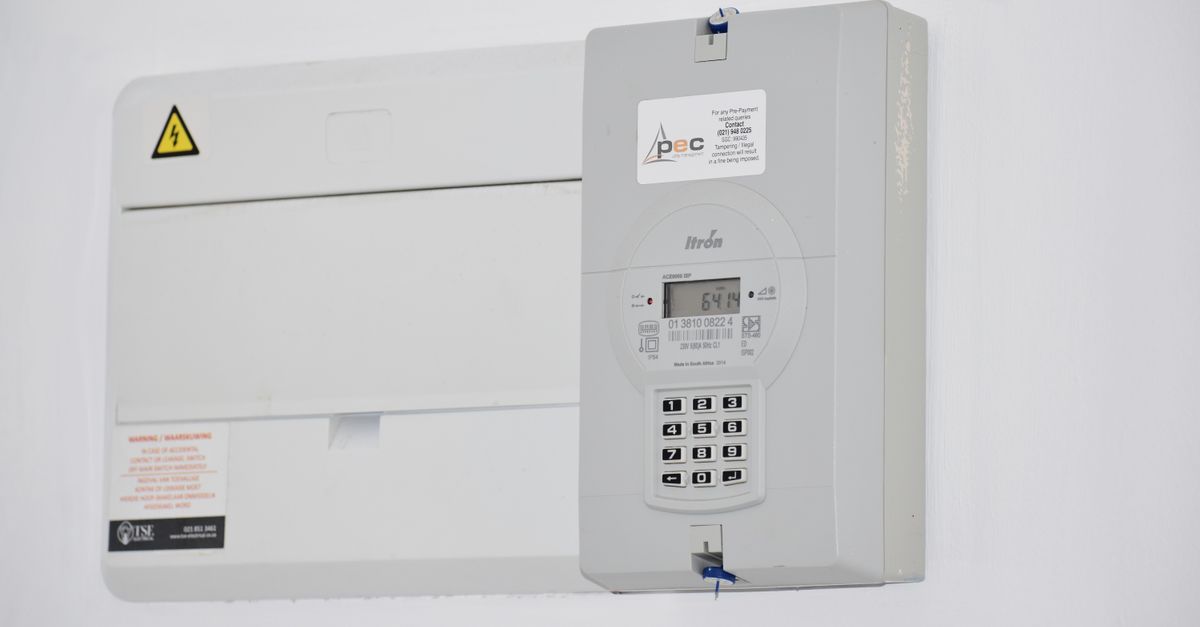
If you currently manage your energy bills on a pay-as-you-go (PAYG) basis — whether with a key, card, or app — you’ll know the frustration of running out of credit at the worst possible moment. Traditional prepayment meters often require a trip to a local shop or PayPoint to top up, and they don’t tell you how much energy you’re using until the credit runs dry. Smart PAYG meters solve these problems by combining the convenience of automatic meter readings with the control of PAYG budgeting.
This guide answers the most common questions directly: how to top up your existing smart meter right now, what emergency credit protections you have, and how SMETS1 and SMETS2 meters differ. If you’re also considering switching supplier, a comparison of the main PAYG offerings is included further below — but if you just need to add credit today, start with the section immediately below.
How to Top Up a Smart Meter Right Now
Smart PAYG meters can be topped up through several methods. The exact options available depend on your supplier, but all major UK suppliers support at least three of the following four routes.
1. Via Your Supplier’s App
This is the fastest method for most users.
- Open your supplier’s app (British Gas, EDF, Octopus, OVO, or Scottish Power each have dedicated apps available on iOS and Android).
- Log in and navigate to the “Top Up” or “Pay As You Go” section.
- Enter the amount you want to add (minimum top-up amounts vary by supplier — typically £5).
- Confirm payment using a saved card or Apple/Google Pay.
- Credit appears on your in-home display (IHD) within minutes for electricity; gas meters can take up to 30 minutes to update under the SMETS2 specification.
2. Online via Your Supplier’s Website
- Log in to your online account at your supplier’s website.
- Select “Top Up” or “Prepayment” from your account dashboard.
- Enter your top-up amount and confirm payment.
- Credit transfer timing is the same as the app method above.
3. At a PayPoint or Payzone Outlet
PayPoint operates a network of over 28,000 retail locations across the UK (petrol stations, newsagents, convenience stores), while Payzone serves a separate but overlapping retail footprint — particularly strong in rural areas and smaller convenience stores. Both networks accept smart meter top-ups.
- Visit a PayPoint or Payzone outlet (use the PayPoint store finder at paypoint.com or the Payzone locator at payzone.co.uk).
- Tell the cashier you want to top up your energy meter.
- Provide your payment card or, if your supplier uses one, your PAYG card or key.
- Pay the amount you want to add.
- Keep your receipt — it contains a top-up token number you may need if the credit doesn’t transfer automatically.
Note: SMETS2 meters typically update automatically via the Data Communications Company (DCC) network. If your meter is an older SMETS1 device, you may need to enter the token number manually on your IHD or meter keypad.
4. By Text Message
Several suppliers, including British Gas, allow top-ups via SMS. The process typically involves:
- Texting a specific keyword and amount to your supplier’s top-up number (check your supplier’s help page for the exact number and format, as these change periodically).
- Receiving a confirmation text with a top-up code if required.
- Entering the code on your meter or IHD if it doesn’t update automatically.
Emergency Credit: What You’re Entitled To
If your smart meter runs out of credit, you are not immediately disconnected. Ofgem’s supply licence conditions (Standard Licence Condition 27) require all suppliers to provide emergency credit protections. However, the specific amounts differ meaningfully between suppliers:
| Supplier | Emergency Credit Amount | Source |
|---|---|---|
| British Gas | £5 | British Gas PAYG help page |
| EDF Energy | £5 | EDF PAYG help page |
| Octopus Energy | £15 | Octopus Energy help page |
| OVO Energy | £5 | OVO Energy help page |
| Scottish Power | £5 | Scottish Power PAYG help page |
Friendly hours (also called “friendly credit”) is a separate regulatory protection. Under Ofgem’s rules, suppliers must not disconnect PAYG customers during evenings and weekends when shops may be closed. This is not a feature exclusive to any single supplier — it is a regulatory requirement applying to all licensed suppliers. The specific hours defined as “friendly” vary slightly by supplier; check your supplier’s PAYG terms for the exact schedule.
When your emergency credit is activated, the amount used is deducted from your next top-up.
SMETS1 vs SMETS2: Why It Matters for PAYG Top-Ups
This distinction is critical for PAYG customers and is frequently the source of top-up problems.
SMETS1 (first-generation smart meters) were installed predominantly between 2012 and 2018. They communicate via a proprietary network tied to the installing supplier. If you switch suppliers, a SMETS1 meter frequently loses its “smart” functionality and reverts to operating like a traditional dumb meter — meaning remote top-ups stop working, and you may need to return to using a key or card at a PayPoint outlet. This is one of the most commonly reported frustrations among PAYG customers on forums including Reddit’s r/UKPersonalFinance.
SMETS2 (second-generation smart meters) communicate via the DCC (Data Communications Company) — a centralised, supplier-agnostic network operated under Ofgem oversight. Because SMETS2 meters connect through the DCC rather than a supplier-specific system, they retain full smart functionality when you switch suppliers. Ofgem’s smart meter rollout data confirms that SMETS2 has been the mandatory installation standard since 2019, though millions of SMETS1 devices remain in service.
If you have a SMETS1 meter and are experiencing top-up problems after switching supplier, contact your new supplier to request either a SMETS2 upgrade or enrolment in the SMETS1 migration programme, through which many SMETS1 meters have been remotely updated to communicate via the DCC network.
In-home displays (IHDs) are the small screen units that show your credit balance and usage. The dominant IHD manufacturers in UK installations are Chameleon Technology and Geo — if you need a replacement IHD, these are the names to reference when contacting your supplier.
Ofgem Price Cap and PAYG Customers
Historically, prepayment meter customers paid a premium over direct debit customers — a longstanding consumer fairness concern. Ofgem equalised the price cap for prepayment meter customers with direct debit customers in April 2023, meaning PAYG smart meter customers now pay the same maximum unit rates and standing charges as equivalent direct debit tariffs. This change is directly relevant if you have seen older articles suggesting PAYG is more expensive — that premium no longer applies under the regulated cap. The Ofgem press release confirming this change is available on Ofgem’s website under its prepayment meter market review publications.
How to Get a Smart PAYG Meter Installed
If you are still on an older key or card meter (typically a SMETS1 or pre-smart device), you can request a SMETS2 upgrade.
Eligibility: All domestic customers in Great Britain are eligible to request a smart meter installation at no upfront cost under the government’s smart meter rollout programme.
How to request: Contact your current energy supplier directly — by phone, app, or online account — and ask for a smart meter installation. Suppliers are obligated under their licence conditions to offer smart meters to domestic customers.
Wait times: These vary by supplier and region. Ofgem’s smart meter rollout statistics (published quarterly on Ofgem’s website) show installation volumes by supplier; individual wait times are not standardised, but most major suppliers quote several weeks to a few months depending on engineer availability in your area.
Existing PAYG debt: If you have outstanding debt on your current prepayment meter, Ofgem’s prepayment meter rules require suppliers to agree a repayment plan with you before or during the switch to a smart meter. Your debt does not disappear, but it should be transferred to your new smart meter account under agreed terms — your supplier must not refuse installation solely on the grounds of existing debt without offering a repayment arrangement.
Supplier Comparison: PAYG Smart Meter Offerings in 2026
It is important to understand what this table is — and is not — comparing. SMETS2 meter hardware is standardised across all suppliers, manufactured by companies including Landis+Gyr, Itron, Honeywell, and Aclara. You are not choosing between different meter devices. What differs between suppliers is the tariff structure, app experience, top-up methods, and customer service quality. The meter itself is largely identical regardless of which supplier installs it.
| Supplier | Top-Up Methods | Emergency Credit | Notable Feature | Customer Satisfaction |
|---|---|---|---|---|
| British Gas Smart PAYG | App, text, online, PayPoint, Payzone | £5 (British Gas help page) | Friendly hours protection (regulatory requirement for all suppliers) | See Citizen’s Advice supplier ratings for current score |
| EDF Energy Smart PAYG | App, online, PayPoint (28,000+ locations per PayPoint’s published network figures) | £5 (EDF help page) | Established network coverage | See Citizen’s Advice supplier ratings for current score |
| Octopus Energy Smart PAYG | App, online, PayPoint | £15 (Octopus help page) | Higher emergency credit buffer than most competitors | Citizen’s Advice has ranked Octopus among top suppliers for customer service in multiple recent quarterly reports — check Citizen’s Advice energy supplier ratings for the current period |
| Scottish Power Smart PAYG | App, online, PayPoint, card | £5 (Scottish Power help page) | Single account for gas and electricity | Note: Scottish Power received an £18 million Ofgem enforcement fine in October 2022 for customer service failures (Ofgem press release, October 2022). Prospective customers should review Citizen’s Advice current ratings before switching. |
| OVO Energy Smart PAYG | App, online, PayPoint | £5 (OVO help page) | In-app usage insights; OVO’s own product pages describe budgeting tools — verify current feature availability on OVO’s PAYG help pages | See Citizen’s Advice supplier ratings for current score |
On Octopus tariffs: Octopus offers several tariff types including variable tariffs that track wholesale prices (such as the Octopus Tracker tariff). These can sometimes result in unit rates below the Ofgem price cap — but they can also exceed it during periods of high wholesale prices. A PAYG smart meter with Octopus does not automatically place you on a price-cap-beating tariff. Check Octopus’s current PAYG tariff terms and compare unit rates against the current Ofgem price cap before switching on this basis.
Key Benefits of a Smart PAYG Meter
- No more estimated bills: Your supplier receives automatic readings, so you pay only for what you consume.
- Real-time budgeting: Your IHD shows usage in pounds and pence, helping you identify waste.
- Remote top-up: Add credit via app, website, PayPoint, Payzone, or text — no need to leave the house.
- Emergency credit protection: All suppliers must provide emergency credit under Ofgem licence conditions (Standard Licence Condition 27).
- Friendly hours protection: Suppliers cannot disconnect you during defined evening and weekend hours — a regulatory requirement for all licensed suppliers, not a feature of any single brand.
- Price cap parity: Since April 2023, PAYG customers pay the same Ofgem-capped rates as direct debit customers.
Frequently Asked Questions
What happens if my smart meter runs out of credit at night? Under Ofgem’s friendly hours rules, your supplier cannot disconnect you during defined evening and weekend periods even if your credit reaches zero. Your meter will continue supplying energy until friendly hours end. The exact hours vary by supplier — check your supplier’s PAYG terms. When you next top up, your emergency credit and any friendly hours debt are deducted first.
Can I top up a smart meter without the app? Yes. All major suppliers support top-up at PayPoint and Payzone outlets using cash or card. Most also support online top-up via a web browser without needing the app. Some suppliers offer text message top-up. You do not need a smartphone to manage a smart PAYG meter.
How long does a smart meter top-up take to show? For electricity, credit typically appears on your IHD within a few minutes of topping up remotely. For gas, the SMETS2 specification means updates can take up to 30 minutes. If you top up at a PayPoint or Payzone outlet and your meter is SMETS1, you may need to enter a token number manually — keep your receipt.
Can I switch suppliers if I have a smart PAYG meter? Yes. If you have a SMETS2 meter, switching suppliers should not affect your smart functionality — your meter communicates via the DCC network, which all licensed suppliers can access. If you have a SMETS1 meter, contact your new supplier before switching to confirm they can support your meter’s smart functions; some SMETS1 meters have been migrated to the DCC network and will work normally, while others may revert to dumb meter operation.
What is the difference between SMETS1 and SMETS2? SMETS1 meters use a supplier-specific communication system and can lose smart functionality when you switch suppliers. SMETS2 meters use the centralised DCC network and retain smart functionality across supplier switches. SMETS2 has been the mandatory installation standard since 2019. If you are unsure which type you have, ask your current supplier.